Data export service
Note:
This service is supported on Microsoft Azure only.You can leverage the Gatekeeper Data Export service to extract raw data and build the copy of the entire Gatekeeper fields into an in-house database. This can be achieved by leveraging a standard ETL tool, such as Azure Data Factory, or others equivalents.
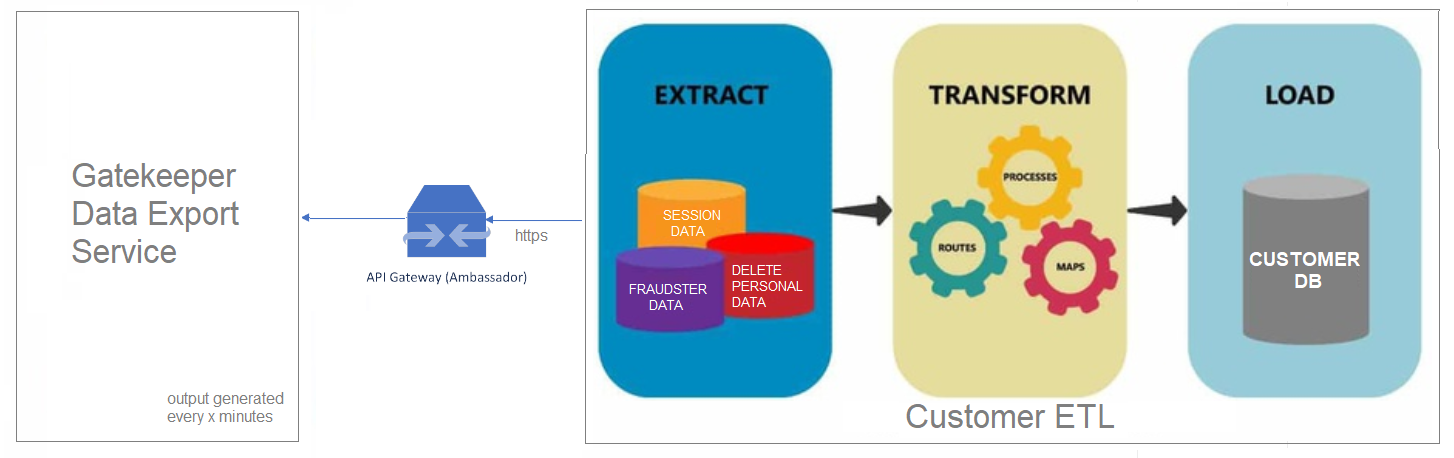
Export data
Gatekeeper offers a mechanism to export baseline data for typical ETL process. Click here to get the data schema and the documentation of each attribute.
The entire schema is offered as a set of CSV files representing the following:
Entity attributes
Following are the entity schema files. The entity schema files have the ent- prefix added to their name:
- ent-engagements
- ent-fraudsters
- ent-groups-persons
- ent-groups
- ent-media-segments
- ent-persons
- ent-processed-audio
- ent-sessions
- ent-voiceprints-enrollment-segments
- ent-voiceprints
- ent-watchlists-fraudsters
- ent-watchlists
Operation attributes
Following are the operation schema files. The operation files have the opr- prefix added to their name:
- opr-delete-personal-data
Factor result attributes
Following are the factor results files. The result files have the res- prefix added to their name:
- res-channel-playback-detections
- res-detect_known-fraudsters-voiceprint
- res-detect-known-fraudsters-convoprint-details
- res-detect-known-fraudsters-voiceprint-details
- res-enroll-convoprint
- res-enroll-voiceprint
- res-identify-convoprint-details
- res-identify-convoprint
- res-identify-voiceprint-details
- res-identify-voiceprint
- res-lock-convoprint
- res-lock-voiceprint
- res-opt-person-in
- res-opt-person-out
- res-process-audio-for-enroll
- res-process-audio
- res-process-text
- res-record-media
- res-sessions-factors
- res-sessions-involved-fraudsters
- res-sessions-involved-persons
- res-suspicious-session
- res-synthetic-speech-detection
- res-train-voiceprint
- res-unlock-convoprint
- res-unlock-voiceprint
- res-validate-text
- res-verify-convoprint
- res-verify-voiceprint
Nuance recommends using the schema CSV files as a starting point to build an SQL relational database where each CSV represents a separate table, and each table can be linked using foreign keys. For example, they can link the factors to gk_session_id and gk_engagement_id.
Schema headers
Each schema CSV file comes with headers, as mentioned below, so that customers can monitor possible changes to the schema:
- a versioned number
- a schema name (also known as
<dataset-name>) - a schema description
- a creation timestamp
The addition of new fields is not considered a breaking compatibility point.
General description of the schema columns
Generally the name of the schema file represent the name of a table in the destination SQL Database.
The following table describes fields mentioned in schema CSV files:
| Field | Description |
|---|---|
| NAME | Field name |
| DISPLAY_NAME | Friendly field name |
| DESCRIPTION | Verbal field description |
| TYPE | Field type (for the column creation in the database) |
| ENUM_VALUES | Possible value of the enumerator |
| VALUE_EXAMPLE | Representative example of the value |
| IS_MANDATORY | If the field is mandatory |
| IS_DEPRECATED | If the field was deprecated |
| ADDED_IN_VERSION | Schema version when a specific attribute was added |
| MODIFIED_IN_VERSION | Schema version when a specific attribute was modified |
Download the data schema file
Download the latest data schema file from the following link:
Notes:
- The retention period for the export data (zip file) of all scopes is 30 days.
- The order of the columns in the output CSV file is not always the same. Read columns using column name instead of column index.
Export data output
Gatekeeper generates a zip output file that contains all the aggregated CSVs. The zip is generated every 5 minutes.
You can access that zip through an https URL pattern. For example, https://<Gatekeeper public API endpoint>/v1/data/gk_scope_id/<schema-name>/yyyy/MM/dd/HH/<schema-name>-yyyyMMddHHmm-yyyyMMddHHmm.zip.
Notes:
- The timestamp of the zip doesn’t necessarily match the timestamps of the entities within the CSV files.
- The API needs OAuth token for client authorization and access to the
Reporting.ExportDataoperation. - The time mentioned in the data output URLs is in UTC.
The following tables lists more detailed examples:
| Example | Example description |
|---|---|
https://gatekeeper.api.nuance.com/v1/data/86ebb5d4-a431-4c21-8131-0880f17709fa/ent-engagements/2022/10/15/14/ent-engagements-202210151405-202210151410.zip |
This example describes a five minute chunk of raw data between 14:05 and 14:10 UTC exclusive. |
https://gatekeeper.api.nuance.com/v1/data/86ebb5d4-a431-4c21-8131-0880f17709fa/ent-engagements/2022/10/15/14/ent-engagements-202210151410-202210151415.zip |
This example describes the five minute chunk of raw data between 14:10 and 14:15 UTC exclusive. |
HTTP response status codes
HTTP response status codes indicate if a specific HTTP request has been successfully completed. The x-ms-error-code header is available in case of error only. Following are common response codes and x-ms-error-code header value during client error:
| Scenario | HTTP status code | x-ms-error-code header value |
|---|---|---|
| API passed successfully | 200 (OK) | - |
| Argument validation check failed | 400 (Bad Request) | InvalidArgument |
| Authentication check failed | 401 (Unauthorized) | - |
| Authorization check failed | 403 (Forbidden) | AuthorizationFailed |
| Requested zip file is in progress | 404 (Not Found) | FileInProgress |
| Requested zip file doesn’t exist | 404 (Not Found) | FileNotFound |
| Internal error occurred | 500 (Internal Server Error) | InternalServerError |
For more details on HTTP status codes, see HTTP response status codes .
General description of output columns
Each CSV output file has its own columns that are documented in the schema CSV. There are three special columns:
$field_mask: List of fields used in the request - mainly important of an updated record, to determine which fields were updated among all other columns.$operation: An enum that describes which operation is performed:- 1 is for insert.
- 2 is for update.
- 3 is for delete.
$timestamp: Original timestamp of the time when an event is published in Gatekeeper. Note that this timestamp is different from the timestamps visible in the web portal.$internal_reference_id: Contains information about the ID that helps in debugging what went wrong with the record.
Note:
The content of each CSV output file is based on asynchronous events. So, the information related to the same engagements may arrive at different time, and it may be captured in the CSV files that follow.Scope configuration parameters
The following are the configuration parameters to control export data:
- DataExport\EnableDataExport (Boolean): Default is false
- DataExport\ExportCsvHeaderPrefix (String): CSV header prefix for data export
- DataExport\ExportCustomData: Pop-up with two columns:
- First column is a drop-down to select the schema name related to entities.
- Second column is a text field to enter the list of comma-separated attributes. Each attribute in this field becomes a new column in the output CSV file.