Gatekeeper engine upgrade
You need to upgrade the Gatekeeper engine to:
- Take advantage of newer authentication, anti-spoofing, and fraud detection technologies.
- Lower rejection rates for the same level of voice spoofing protection.
- Up to 50% improvement in rejection rates based on benchmark data. Depending on engine calibration and configuration.
New Gatekeeper engines are automatically pushed to customer production scopes as part of existing product release versions. There are three distinct types of Gatekeeper engines that must always match to generate predictable and accurate decisions.
- NVSL: The core engine that processes audio signal and generates verification, known fraudster detection, and synthetic speech detection outputs.
- Playback Model: Processes audio signal and generates channel playback detection outputs.
- NRSL Risk Engine: Combines verification, known fraudster detection, synthetic speech detection and channel playback detection outputs to render all session and engagement decisions. The Risk Engine includes 10 calibrations, each representing an incrementally higher trade-off between false accept and false reject security settings. Set authentication and fraud thresholds appropriately because they aren’t normalized across Risk Engine versions or calibrations.
Note:
By design, standalone APIs such as Verify, Identify, DetectAntiSpoofing, DetectKnownFraudster don’t work with NVSL 12 frameworks. NVSL 12 frameworks are only intended to be used with the AnalyzeAudio API.Gatekeeper factory risk engines
You can use Gatekeeper Factory Risk Engines compatible with NVSL12. These engines appear in the RiskEngineCalibrationModelID drop down with the following naming convention: FACTORY_TI_RISK_ENGINE_1_6_DKF5_SSD6_PBD3.
-
FACTORY_TI_RISK_ENGINE_1_6: Represents the risk engine version 1.6 that is compatible with NVSL12 TI models
-
DKF5: Represents the relative sensitivity (5 out of 5) for Detect Known Fraudster factors.
- 1 = lower false positive and higher false negative rate
- 5 = higher false positive rate and lower false negative rate
-
SSD6: Represents the relative sensitivity (6 out of 7) for Synthetic Speech Detection
- 1 = lower false alert rate and lower synthetic speech detection performance
- 7 = higher false alert rate and higher synthetic speech detection performance
-
PBD3: Represents the relative sensitivity (3 out of 4) for Playback Detection
- 1 = lower false alert rate and lower playback detection performance
- 4 = higher false alert rate and higher playback detection performance
Unlike custom calibrations, these risk engines aren’t adapted to customer-specific audio conditions or production data. They’re calibrated on proprietary, internal benchmark datasets.
The new updated engines won’t be automatically configured. No changes occur to your existing deployment unless a Gatekeeper customer administrator proactively upgrades the engines.
Using a combination of Detect Known Fraudster, Synthetic Speech Detection, and Playback Detection sensitivities, the total false reject rates vary from 2% to 10%.
Multiple NRSL risk engines let you control these metrics with granularity. If performance isn’t as expected, changing the NRSL risk engine to a different calibration can adjust the security versus convenience trade-off.
For example, FACTORY_TI_RISK_ENGINE_1_6_DKF5_SSD6_PBD3 is deployed. After processing 10,000 calls in production, the Successfully Authenticated Sessions (%) is too low. Switching to FACTORY_TI_RISK_ENGINE_1_6_DKF4_SSD5_PBD2 incrementally improves the Successfully Authenticated Sessions (%) at the trade-off of fewer fraud alerts across Detect Known Fraudster, Synthetic Speech Detection, and Playback Detection factors.
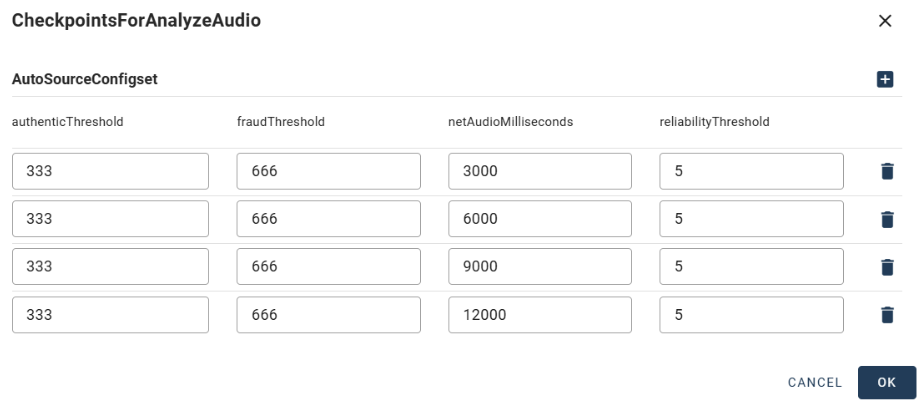
NVSL12 and the associated risk engine 1.6 frameworks use CheckpointsForAnalyzeAudio threshold configuration. CheckpointsForAuthentication (voiceprints coordinator) and CheckpointsForFraudDetection (voiceprints coordinator) threshold configurations are ignored. CheckpointsForAnalyzeAudio thresholds can be used for granular control of each individual risk engine.
Key steps in upgrading your existing Gatekeeper engines
Here are the key steps in upgrading your existing Gatekeeper engines:
- Update the configuration to use updated NVSL, playback, and risk engines
- Contact center flow configuration
- Scope-level standard configuration
- Checkpoint configuration
- Retrain the fraudster watchlist
- Check and correct for consistency errors in your fraudster watchlist
- Enable voiceprint upgrade mode
- Monitor and track the decision performance
Update the configuration to use updated NVSL, playback, and risk engines
Gatekeeper scope admins can consult the Calibration Models page to check which engines are available.
- The following configuration parameters represent the version of NVSL in use:
- VoiceprintCalibrationModelId
- BackwardSearchVoiceprintCalibrationModelId
- BackwardSearchVoiceprintCalibrationModelId
- The RiskEngineCalibrationModelId parameter represents the version of NRSL in use.
- The PlaybackCalibrationModelId parameter represents the version of Playback detection in use.
Contact center flow configuration
This section describes the contact center flow configuration to support the engines.
FlowVersion parameter
Gatekeeper supports two types of person authentication flows. The FlowVersion configuration parameter determines which flow is used:
- v1: For legacy NVSL engines, each biometric factor is called separately.
- v2: For advanced NVSL engines, biometric operations are processed in parallel.
The main difference is the authentication flow:
- v1: After the Verify factor completes, the flow continues with anti-spoofing or detect known fraudsters based on having a mismatch.
- v2: Verify, Detect Fraudsters, and Anti-spoofing factors are called in parallel which optimize the performance and accuracy.
The following table lists the supported biometric factors:
| Biometric operation | v1 | v2 |
|---|---|---|
| Process Audio | Supported | Supported |
| Voiceprint Enroll/Train | Supported | Supported |
| Voiceprint Authentication | Supported | Supported |
| Voiceprint fraudsters detection | Supported | Supported |
| Audio Spoofing (playback, synthetic speech) | Supported | Supported |
| Convoprint | Supported | Not supported |
| Deviceprint | Supported | Not supported |
| Caller ID Validation | Supported | Not supported with Factory Risk Engines. Custom Risk Engine required. |
| Caller ID Watchlist | Supported | Not supported with Factory Risk Engines. Custom Risk Engine required. |
| Post call parameters | Supported | Supported |
Scope configuration parameters (moving from v1 to v2)
| Parameter | v1 | v2 |
|---|---|---|
| Flow version | v1 | v2 |
| (*) Convoprint parameters | Optional | Not Applicable |
| Caller ID validation parameters | Optional | Optional |
| Caller ID watchlist parameters | Optional | Optional |
| (*) Device print parameters | Optional | Not Applicable |
| Enroll parameters | Optional | Optional |
| (*) Detect Fraud On Mismatch | Optional | Not Applicable |
| Detect Fraud On [other] | Optional | Optional |
| (*) Perform Audio Spoofing Detection | Optional | Optional – applies also for Verify flow |
| (*) Perform Audio Spoofing Detection On Match | Optional | Not Applicable |
| Perform Audio Spoofing Detection on [Other] | Optional | Optional |
| (*) Watchlist and Watchlist Voiceprint Tag | Optional | Optional – triggers Detect Fraud for Verify flow |
| Post call parameters | Optional | Optional |
(*) – marks parameters that has some difference in the usage between v1 and v2.
For v2, there isn’t any specific parameter that isn’t applicable for v1.
Scope-level standard configuration
Set some of the following standard scope-level configuration parameters (processing condition) to support the updated engines:
-
Realtime Detect Known Fraudster (DKF)
Configuration parameter Set as DetectFraudOnEnroll True DetectFraudOnLocked True DetectFraudOnOptedOut True DetectFraudOnOptingOut True -
Realtime spoofing
Configuration parameter Set as PerformAudioSpoofingDetection True PerformAudioSpoofingDetectionOnEnroll True PerformAudioSpoofingDetectionOnLocked True PerformAudioSpoofingDetectionOnOptedOut True PerformAudioSpoofingDetectionOnOptingOut True PerformAudioSpoofingUsingMediaSegment False -
Post call DKF
Configuration parameter Set as PostCallDetectFraudOnEnrollment True PostCallDetectFraudOnLockedOrOptedOut True PostCallDetectFraudOnMatch True PostCallDetectFraudOnMismatch True PostCallDetectFraudOnOptingOut True PostCallDetectFraudOnRiskySession True PostCallDetectFraudOnSpoofingDetected True PostCallDetectFraudOnSuspicious True -
Post call spoofing
Post call operational configuration
Post Call now internally utilizes the new AnalyzeAudio API. The associated operational configuration parameters are as follows:
- CheckpointsForAnalyzeAudio
- PostCallDetectChannelPlaybackOnOrphanEnabled
- PostCallDetectSyntheticSpeechOnOrphanEnabled
Checkpoint configuration
The following screenshot shows the CheckpointsForAnalyzeAudio configuration settings:
Checkpoint logic in AnalyzeAudio API
This section describes how the AnalyzeAudio API uses the CheckpointsForAnalyzeAudio configuration parameter to compute intermediate results during an AnalyzeAudio session.
Used thresholds
The AnalyzeAudio API uses CheckpointsForAnalyzeAudio to determine when intermediate results should be computed, based on netAudioMilliseconds.
For each selected factor—Authentication, Antispoofing, and DetectKnownFraudster—the API calculates intermediate results and requests the risk engine to return both:
- A risk score per factor
- A cumulative risk score that considers all selected factors together (ignoring other session factors)
Each individual factor uses a single threshold only:
- Authentication uses authenticationThreshold: The decision is MATCH if the risk is below this threshold ().
- Antispoofing uses fraudThreshold: The decision is FRAUD if the risk exceeds this threshold ().
This is always treated as a binary classification problem (2 classes) at the factor level.
For the cumulative risk, the classification can be:
- 2 classes if only authentication factor is selected. In this case, only authentication threshold is used, while fraud threshold is ignored.
- 2 classes if only fraud-related factors are selected. In this case, only fraud threshold is used, while authentication threshold is ignored.
- 3 classes if both authentication and fraud factors are included. In this case, both authentication threshold and fraud threshold are used.
Note:
Session decision thresholds are never used by AnalyzeAudio API.Example 1
At the first checkpoint (3 seconds) during an AnalyzeAudio session, both authentication and antispoofing factors are selected:
- Authentication factor risk score: 200 → Decision: MATCH (risk is below the authenticationThreshold of 333)
- Playback channel risk score: 500 → Decision: NO_RISK (risk is below the fraudThreshold of 666)
- Synthetic speech risk score: 800 → Decision: FRAUD (risk exceeds the fraudThreshold)
- Cumulative risk (combined score from all three factors): 700 → This scenario involves both authentication and fraud factors, making it a 3-class classification problem. → Since the cumulative risk exceeds the fraudThreshold, the overall decision is FRAUD.
Example 2
At the first checkpoint (3 seconds) during an AnalyzeAudio session, both authentication and antispoofing factors are selected:
- Authentication factor risk score: 100 → Decision: MATCH (risk is below the authenticationThreshold of 333)
- Playback channel risk score: 200 → Decision: NO_RISK (risk is below the fraudThreshold of 666)
- Synthetic speech risk score: 700 → Decision: FRAUD (risk exceeds the fraudThreshold)
- Cumulative risk (combined score from all three factors): 600 → This is also a 3-class classification problem. → Since the cumulative risk falls between the authenticationThreshold (333) and the fraudThreshold (666), the overall decision is MISMATCH.
Stop criteria
When an intermediate result is computed, the AnalyzeAudio API decides whether to continue processing the audio or to stop.
- If the StopOnLastCheckpoint configuration parameter is set to true and the final checkpoint has been reached, processing stops regardless of the risk score at that checkpoint.
- If the StopOnMatch parameter is set to true and the cumulative decision at an intermediate checkpoint is MATCH, then processing also stops.
Note:
For the StopOnMatch condition to apply, there must be an authentication factor present, and the cumulative risk score must be below the authentication threshold.Example 1
- StopOnLastCheckpoint = false
- StopOnMatch = false
Audio processing continues until the end; it doesn’t stop early.
Example 2
- StopOnLastCheckpoint = false
- StopOnMatch = true
AnalyzeAudio is configured with only fraud-related factors.
Since the cumulative decision can only be FRAUD or NO_RISK, it will never be MATCH, so processing continues until the end.
Example 3
- StopOnLastCheckpoint = true
- StopOnMatch = true
AnalyzeAudio is configured with only fraud-related factors.
Again, the decision will never be MATCH, but since StopOnLastCheckpoint is enabled, processing stops at the final checkpoint, regardless of the risk score.
Example 4
- StopOnLastCheckpoint = true
- StopOnMatch = true
AnalyzeAudio includes both authentication and antispoofing factors.
If at any checkpoint the cumulative risk is below the authentication threshold, the decision is MATCH, and processing stops immediately, returning MATCH as the result.
Retrain the fraudster watchlist
The watchlist retrain action in Gatekeeper updates and manually upgrades the fraudster voiceprints stored in the watchlist. This action is critical when upgrading the runtime calibration model to a new version. If fraudster voiceprints aren’t upgraded to the newer engine version, Known Fraudster Detection runs in production, which might lead to missed detection of fraudster calls.
When to run a watchlist retrain action
You must run a watchlist retrain action after updating the configuration sets to the new engine version.
Watchlist Retrain Execution Time: The retraining process is time-consuming, especially if the watchlist has many voiceprints. For example, retraining a watchlist with 1,000 fraudsters can take up to an hour. It’s recommended to perform this operation offline during off-hours to minimize the impact on live calls. Proper testing in lower environments, scheduling, and monitoring are essential to avoid disruptions.
Output of the watchlist retrain action
The output of the watchlist retrain action includes:
-
Voiceprints in the watchlist are retrained to reflect the latest calibration models in the system.
-
The process generates statistical information about the task execution, such as the number of voiceprints retrained, failed, or skipped.
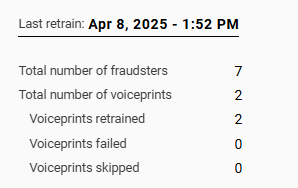
If a voiceprint is inconsistent or can’t be retrained, it’s automatically removed from the watchlist to avoid runtime issues.
Check and correct for consistency errors in your fraudster watchlist
The Watchlist Consistency Check in Gatekeeper is a feature designed to manage and verify the integrity of the fraudster watchlist. It ensures that the voiceprints in a fraudster watchlist are consistent with selected configuration and calibration model.
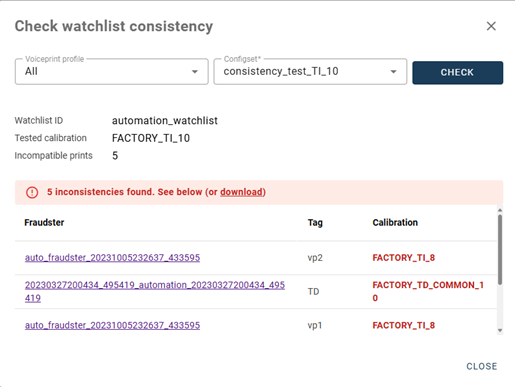
This operation is read-only and doesn’t affect existing entities. Fraud Analysts can run this action from the watchlist page. The operation generates a list of fraudster voiceprints that are inconsistent with the selected configuration. Remove these incompatible voiceprints from the watchlist because they don’t work with the current engine version.
To ensure all fraudster voiceprints are compatible, revalidate the watchlist against the configuration set after retraining using the Check Watchlist Consistency feature.
This example output identifies problematic fraudster prints that need removal:
Enable voiceprint upgrade mode
Enabling the automatic retrain feature eliminates the need to run a batch enrollment to retrain millions of customer voiceprints. Instead of manually updating each voiceprint, the system triggers the upgrade during the first verification after the engine upgrade. This approach reduces the operational burden, ensures customer voiceprints benefit from the latest engine performance, and avoids extensive system downtime, intervention, or monitoring by specialized resources.
To enable the automatic retrain feature, set the EnablePrintUpgradeMode configuration parameter to True.
This feature maintains the integrity and accuracy of voiceprints while minimizing disruptions to live operations.
Note:
Depending on the call flow implemented, enabling this feature can increase the processing time for verifications and identifications.After the first verification, the voiceprint is saved in the new format. Subsequent verifications are faster because the system doesn’t need to perform the upgrade process for those voiceprints.
Upgrade your customer voiceprints
Customer voiceprints consist of two components: the voiceprint and the underlying enrollment audio. A voiceprint is specific to the NVSL version used to create it. When upgrading NVSL, customer voiceprints are recreated on demand from the initial enrollment audio as part of the factory Gatekeeper verification call flow.
The process for upgrading the runtime voiceprint mechanism works as follows:
- When Gatekeeper receives a verification request, it compares the voiceprint version to the configured NVSL engine version.
- If the voiceprint version differs from the NVSL engine version, a new voiceprint is created using the enrollment audio.
- After upgrading the voiceprint, the verification process is executed, ensuring the caller immediately benefits from the upgraded engine’s performance.
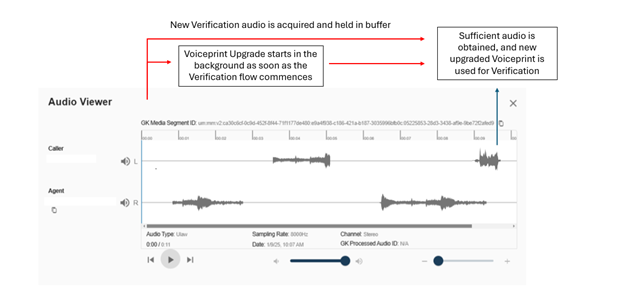
The runtime voiceprint upgrade is the only supported process to upgrade your existing voiceprints.
Monitor and track decision performance
Using the Gatekeeper dashboard or the custom reporting solution, it is highly recomemnded to track the following metrics before and after the upgrade to ensure that the system is performing as expected:
- Successfully Authenticated Sessions (%)
- Call AHT (Match)
- Real Time Fraudster Hit trend
- Post Call Fraud Hit trend
- Fraud Accuracy Rate
Note:
Multiple NRSL risk engines let customers control these metrics with granularity. If performance isn’t as expected, changing the NRSL risk engine to a different calibration can adjust the security versus convenience tradeoff.For example, Risk Engine Setting 8 is deployed. After processing 10,000 calls in production, the Successfully Authenticated Sessions (%) is too low. Switching to Risk Engine setting 7 incrementally improves the Successfully Authenticated Sessions (%) at the trade-off of fewer fraud alerts.
Other considerations
- Upgrading customer voiceprints using the Gatekeeper voiceprint upgrade feature doesn’t incur any additional transactional costs.
- The runtime Gatekeeper voiceprint upgrade works with factory call flows and factory audio processing. Custom call flows, webhooks, custom API integrations, and custom configurations might not be compatible or can introduce latency. It’s strongly recomended to test the mechanism in lower environments and assess the impact of your custom implementations with your professional services provider.
- Customer voiceprints don’t need retraining when changing Risk Engine calibrations.
- Fraudster voiceprints don’t need retraining when changing Risk Engine calibrations.
- Creating a new voiceprint involves processing the enrollment audio to create and train the voiceprint. Processing typically takes 1 to 3 seconds for 30 seconds of enrollment audio. Latency might occur in certain use cases.
- When using factory contact center call flows where the speaker ID is available at time zero (when the agent picks up), retraining occurs while customer speech is collected, making the voiceprint upgrade seamless.
- If sufficient verification audio is in the buffer when a speaker ID is submitted to Gatekeeper, retraining time is noticeable, and verification results are delayed.
- For an IVR integration where both the audio and verification are submitted to Gatekeeper simultaneously, latency in response time occurs.
Frequently asked questions
Why can’t all customer voiceprints be retrained offline?
Gatekeeper only supports a single version of NVSL per scope. Verification and fraud detection could only recommence occur once all voiceprints have been upgraded. Retraining of all voiceprints in batch would require significant system downtime to retrain and ongoing monitoring and support of the retraining process.
What is the fall-back plan if something goes wrong?
If for whatever reason, significant issues are identified post upgrade, the version of the three engines can be returned to their original state and watchlist retrained to the previous version. The run time voiceprint mechanism automatically retrogrades the newly updated voiceprints.